GitHub
Open source · Rust · MIT / Apache-2.0

The operational agent platform.

One agent. A whole organisation. Engineered for the long run.

Meerkat is an open-source platform for building and operating agents. Run one from a command, embed a team in your product, or keep hundreds working across an organisation for months. Agents retain their identities and history as work changes and processes restart. Execution, coordination, memory, integrations and security share foundations built for native asynchronous operation, with critical lifecycles model-checked. Mix cloud and self-hosted models in the same team, on infrastructure you control.

How is this different from Codex, Claude Code, Cursor, Copilot or Pi?

Codex, Claude Code, Cursor, Copilot and Pi can turn an ambitious brief into working software, tackling complex problems for days with little intervention. They are built around delivering a result, with a person setting direction and judging the outcome.

Meerkat is built for agents that become part of a running operation. They respond to events, coordinate work and carry responsibilities for months. Tasks come and go; the agents keep their identities, memory and roles.

Teams can span machines; agents communicate directly and coordinate shared work. Your application controls membership and connections. Critical lifecycle rules are model-checked, while scheduling, recovery and access control govern how work continues and under whose authority.

The same foundation is composable: compile in only what you need for an ESP32 or WebAssembly, or use the full integrated platform, including Meta, Connect and Recall. Open source and provider agnostic throughout. That is what we mean by an operational agent platform.

An agent in a pipe.It stays running and wakes on every new line of the log, keeping what it has already seen. Searches of older logs and recent changes run in the background and report back into the same session, and it prints what a person should act on. No server to run.
An agent inside your service.Build an agent into your own service in a few lines of Rust and get a typed result back. Python, TypeScript, REST, JSON-RPC, MCP, the CLI and the browser reach the same runtime.
An agent for each person, specialists behind them.Mail, school and service apps, calendar changes and documents reach triage first; camera events go straight to the security agent. Specialists hand results to the person's own agent, which decides what the person hears.
Repositories, people and initiatives on one network.Domain agents know each repository and consult each other across repositories. People work through their own agents. Each initiative has an agent that holds its work items, and analysis agents review and investigate them around the clock.

What it is

A complete operational platform, composable down to the runtime. Compile in the capabilities you need: a minimal, low-footprint agent on an embedded device, or a full-featured harness running in a data center. At its fullest, Meerkat integrates agent teams, memory, integrations, identity, security and operations with Recall, a complete knowledge system for evidence, relationships and traceable conclusions.

Which parts would I use?
Core
The composable runtime: tools, skills, structured output, image generation and live voice, with the capabilities you choose to compile in. Package a team's definitions and assets as a reusable mobpack, ready to run natively or build for the browser.
Meta
Application services around Core: agent memory, access rules, approvals, routing and the console. Use it to operate agents together as an application.
Connect
Let an agent work out which integrations a job needs and prepare their setup. Your application authorizes access and attaches the tools. You can also supply integrations yourself.
Recall
A knowledge system in its own right. Recall connects documents, entities, relationships and claims to evidence. It keeps conflicting evidence distinct, traces conclusions to their sources and shapes answers around what each requester is allowed to see.
Security

Delegate the work.
Keep the authority.

Give an agent access to your calendar without permission to delete it. Let it prepare an invitation, but ask you before sending. Meerkat separates who the agent acts for, what it may do and which actions need approval, with permission checked when the action is about to happen.

One account.
Three different decisions.
Maya Assistant Work calendar

Acting on behalf of Maya, within a calendar-specific grant.

Read availabilityWithin the grant. No additional review.
Allowed
Send the invitationPermitted, with approval for these recipients.
Ask Maya
Delete the calendarOutside the grant, even if the account can.
Refused
Inside the security model
01 / Identity & delegation

On your behalf. Within your bounds.

The requester, executing agent, represented person and connected account have distinct identities. Grants can narrow actions, resources, recipients, lifetime and delegation depth. A helper cannot widen its parent's grant; expiry and revocation are checked along the chain.

02 / Attribute-based access

The person, the resource, the action.

Meta's ABAC rules match people and groups against agent roles and labels, with separate controls for conversations, memory, topology, work and administration. Native operation grants and each resource's own policy govern execution. Seeing an agent in the console does not grant its tools.

03 / Action review

Automatic, reviewed, or yours to decide.

Policy can require local permission alone, a bounded model review, or fresh human consent. Reviews bind to the exact proposed action. Changed arguments, accounts or recipients need a fresh check. Neither a reviewer nor an approval can override missing permission.

04 / Process isolation

A real boundary around execution.

Required sandbox profiles constrain filesystem access, network connections, environment and inherited handles for confined shell and MCP processes. Linux and macOS have native backends. If the host cannot enforce the selected requirements, the launch is refused.

05 / Current authority

Permission is checked at the point of use.

Delayed actions are checked again before execution. A previous allow is not a permanent permit. A refused operation gives the agent feedback to choose another permitted action, while independent allowed work can continue.

06 / Audit

Know what was decided. And what happened.

Audit records distinguish permission decisions, reviews, consent consumption, execution attempts and returned outcomes. They stay associated with the work that caused them. Uncertain outcomes remain explicit, so an approval or a missing result is never mistaken for a completed action.

Configure governance at the runtime, resource and process boundaries your application uses. Console access rules and provider sign-in do not activate those controls on their own. Information already read into a model context still requires appropriate handling rules and separation.

Meerkat ConnectPreview

Give it the job. It finds the tools.

Describe the job, such as turning a week's Slack updates into an email draft and a changelog. The agent identifies the capabilities it needs, finds integrations in the library or researches beyond it, and prepares the setup. Your application connects the tools with the accounts and access you choose.

Install Connect · Supported platforms and scope

100+integrations in the library

  • SlackTeam chat
  • GitHubCode
  • GmailEmail
  • NotionKnowledge
  • Google CalendarSchedules
  • PostgreSQLDatabases
  • LinearProjects
  • StripePayments
  • FigmaDesign
  • Microsoft TeamsTeam chat
  • SalesforceCustomers
  • Google DriveFiles
  • arXivResearch
  • ShopifyCommerce
  • DiscordCommunities
  • SupabaseDatabases
  • HubSpotCustomers
  • Amazon S3Storage
  • PubMedResearch
  • Google SheetsSpreadsheets
  • OpenWeatherWeather
  • JiraProjects
  • YouTubeVideo
  • TwilioMessaging
  • WordPressPublishing
  • ZoomMeetings

A selection. Supported actions and setup vary by integration.

How the agent finds and connects tools
Walkthrough
  1. 01Job

    “Every Monday, summarise last week's #releases in Slack, draft an email to the team and add it to our changelog.”

    One request. The agent finds the integrations.

    Start with the job Describe the outcome. Integrations don't need to be named up front.

  2. 02Needs

    • Read channel historySlack
    • Create an email draftEmail
    • Add a changelog entryChangelog
    • Not needed
    • Reply in Slack as the agent
    • Send email

    Identify the capabilities Reading a Slack channel and replying in Slack as the agent are separate capabilities. So are drafting and sending.

  3. 03Find

    • Library
    • Slackmatch
    • Gmailmatch
    • Changelogno match
    • Beyond the library
    • Reads the docs
    • Compares packages
    • Picks onecandidate

    Library first, then beyond Two needs match the library. For the third, the agent researches packages and picks one.

  4. 04Prepare

    • Setup plan
    • Slackread #releases
    • Gmaildrafts only
    • Changelog packageinstall
    • Package choice validated by setup code
    • Needs from you
    • Accounts and access

    Setup, prepared Setup code validates the package choice. The plan lists the accounts and access each tool needs.

  5. 05Connect

    • You choose
    • Slack: read #releases: allowed
    • Gmail: drafts only: allowed
    • Install changelog package: allowed
    • Send email: not enabled
    • Tools attached by your application

    Your application connects You choose accounts and access. Your application authorizes the install, holds the credentials and attaches the tools.

Tools to use

Services the agent reads from and works in, like the Slack, Gmail and changelog tools above.

Chat with agents in your apps

Use Slack, Telegram or another messaging app as the interface to your agents. Set up the conversation channel separately from the tools agents use to read data or take actions.

Meerkat Meta

Run the whole system from one place.

Meta brings agents together as an application, with memory, routing, access control and approvals. Its console is a ready-to-use interface and a UI framework you can adapt: change the layout and branding, add application-specific views, or build your own interface from reusable React components.

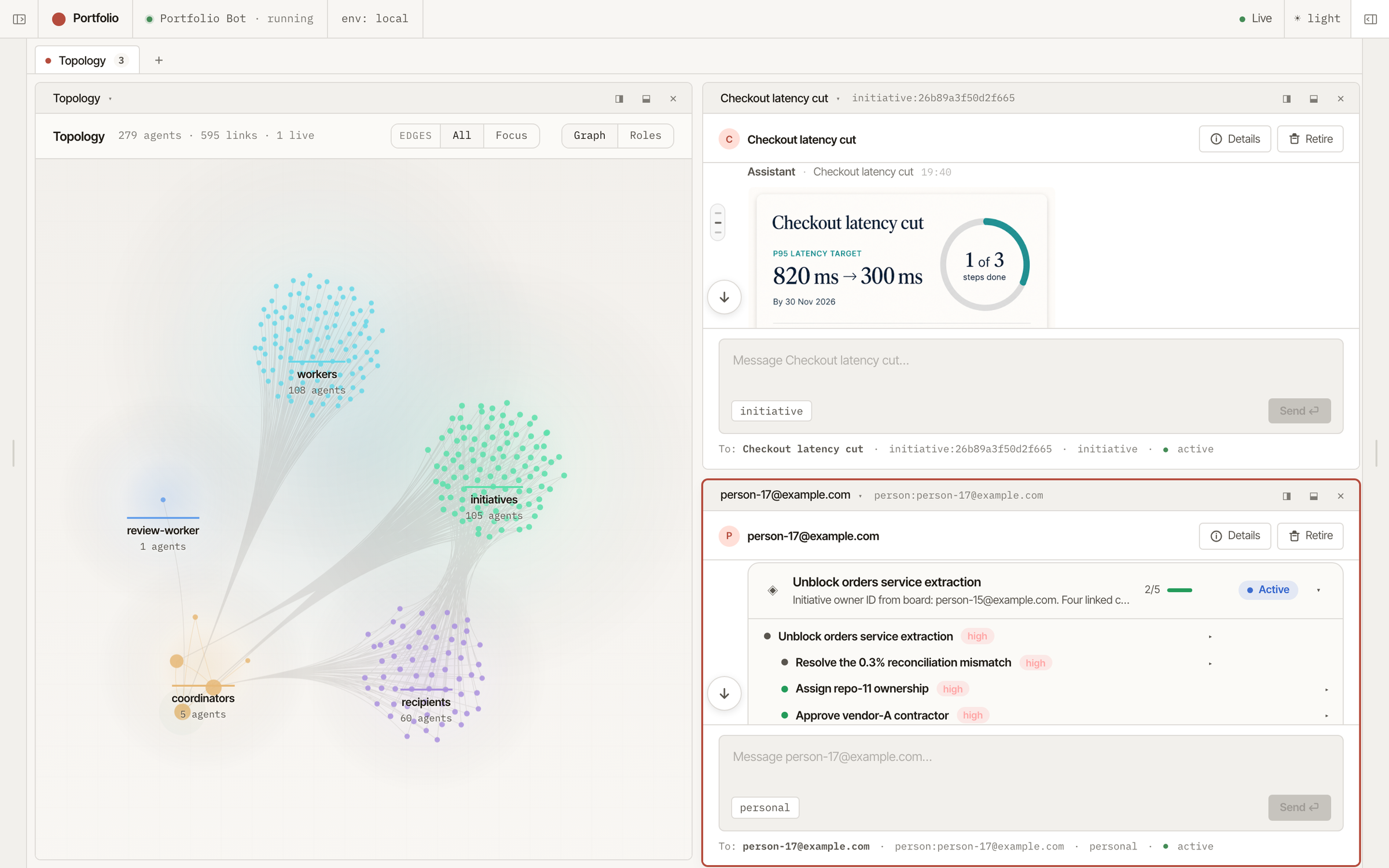
Meerkat Meta console: agent topology beside conversations with a generated progress card and a WorkGraph card (full size, new tab)
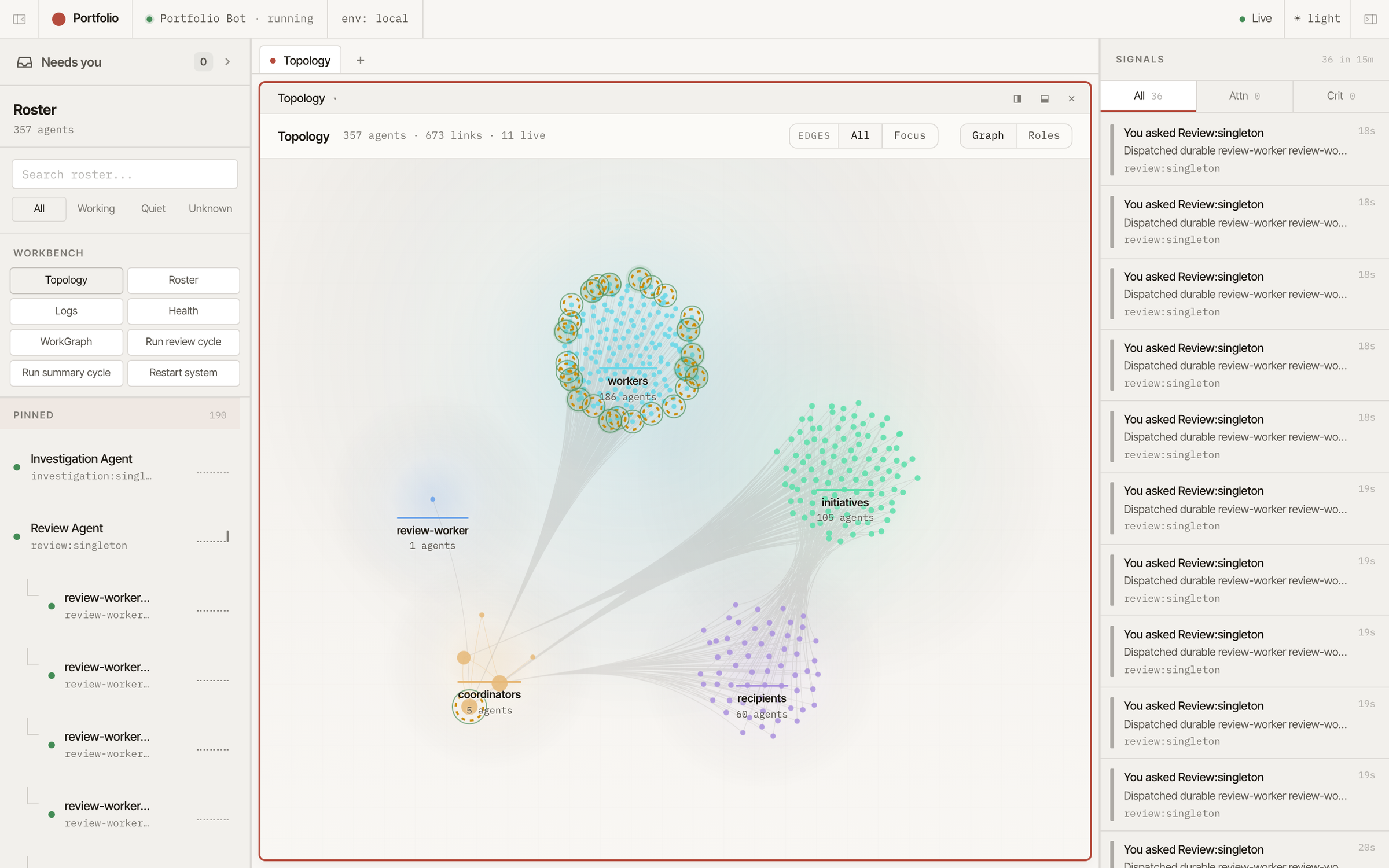
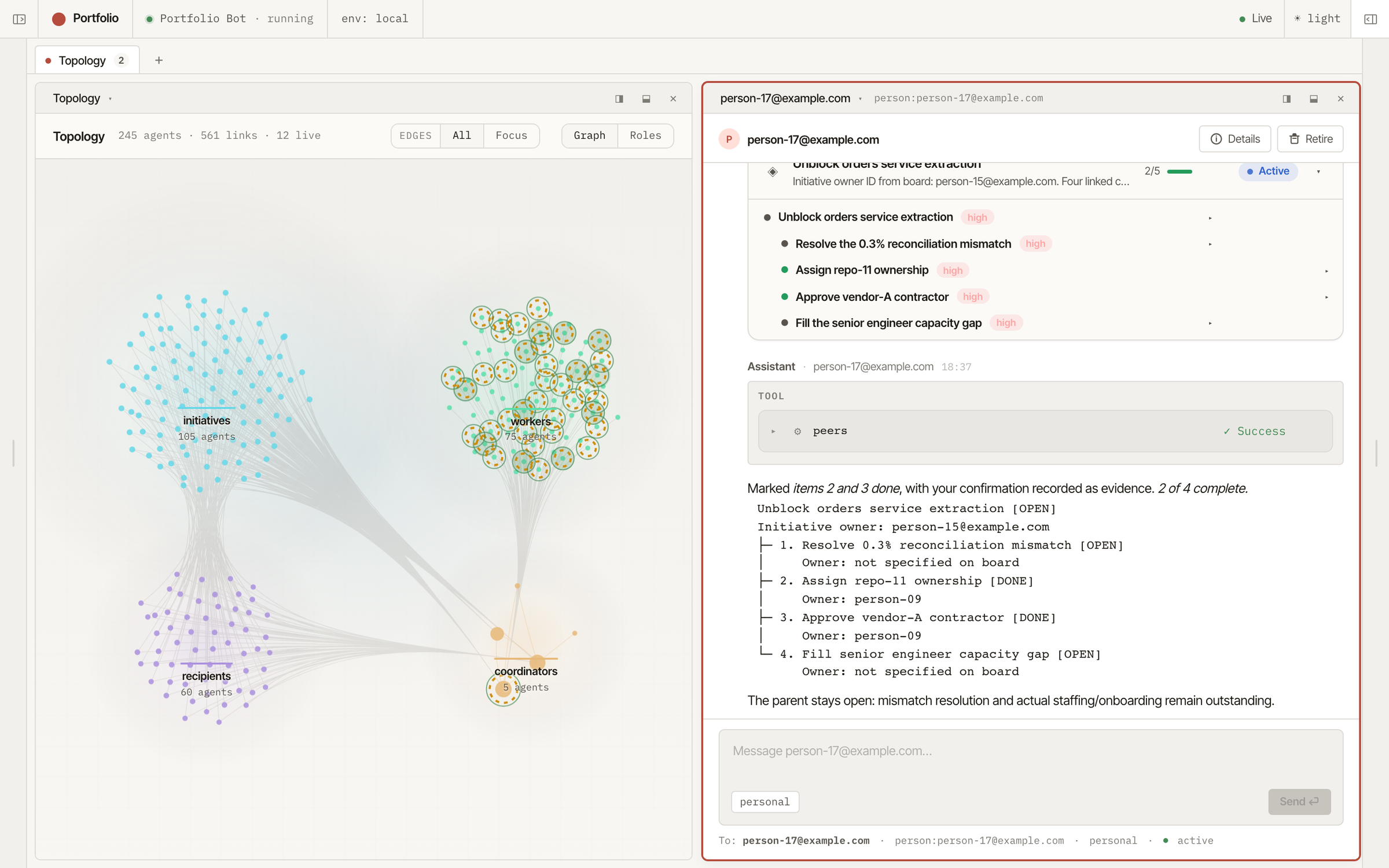
Meerkat Meta console: agents and links grouped into initiatives, workers, recipients and coordinators (full size, new tab)
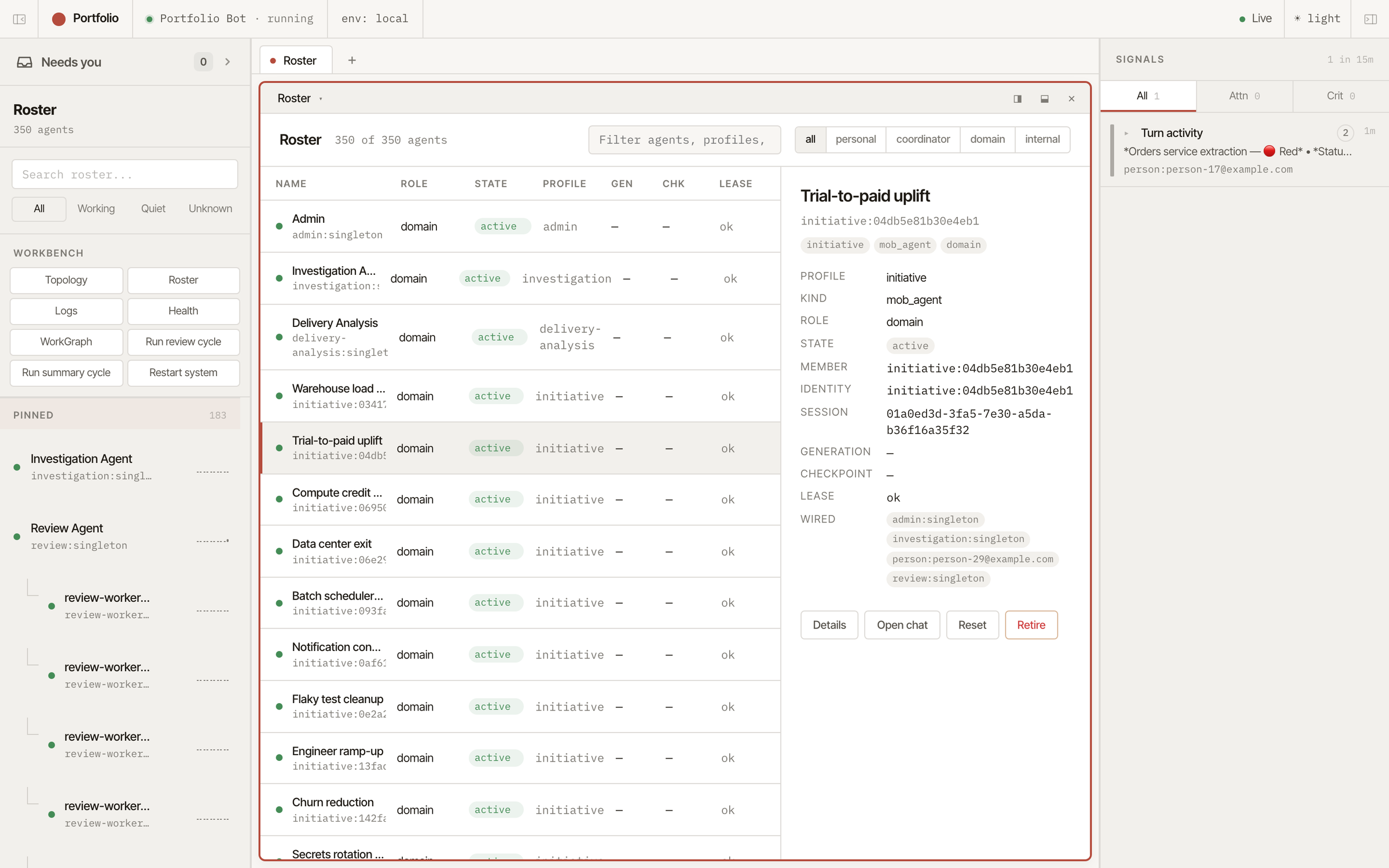
Meerkat Meta console: the agent roster, with one initiative agent selected to show its profile, session and wiring (full size, new tab)
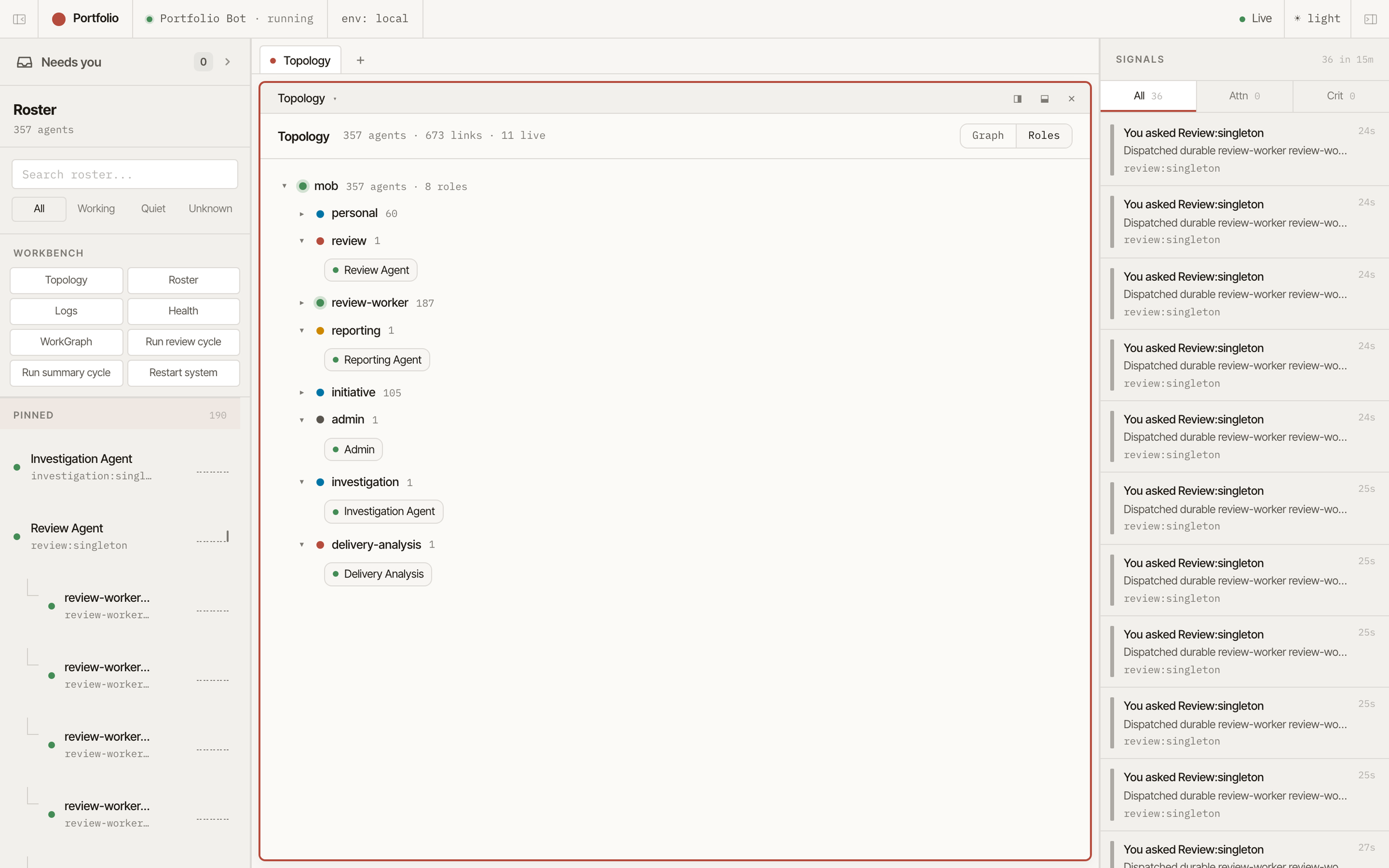
Meerkat Meta console: agents grouped by role (full size, new tab)
The Meerkat Meta console: a personal agent's conversation with a WorkGraph card and its linked work items, beside the live topology (full size, new tab)

The system view: the agent topology, an initiative agent's generated progress card, and a person's own agent tracking shared work.

The topology view: review workers cluster around the work they were sent to do, with their links to the rest of the system.

Every agent with its role, profile, state and lease. Select one to see its session and the agents it is wired to.

The same system as a tree of roles: personal and initiative agents, the analysis agents, and the workers they send out.

A person asks their own agent about an initiative. It updates the shared work in the WorkGraph and records the confirmation as evidence.

UI framework

Use the supplied console or make it part of your own product. Reuse its conversations, topology, shared work and approval controls; add your own panels and content renderers. Branding, navigation and layout can follow your application.

Memory

Agents keep useful experience with its source and trust level, recall relevant records for the task at hand, and consolidate memory in the background. Sharing is controlled; untrusted writes wait in quarantine.

Policy

Decide who can read an agent's conversations or memory, who can direct its work, and which actions need approval. Different people can have different access to the same system.

Operations

Route requests to the right agents and deliver results to people or channels. Monitor agent health and connect your application through the gateway and Python or TypeScript SDKs.

See agents work, remember and ask for approval
Console / Topology
  1. Ask Ana asks her personal agent, the same identity she used yesterday. It recalls how she likes updates and passes the question to Release, an ongoing coordinator.
  2. Work Release opens a task and starts two temporary workers. A reviewed decision from its own memory is recalled into the work, and the Platform agent contributes.
  3. Approve The draft is ready, but emailing customers is configured to need approval. The send waits until Ana approves it, then the application delivers it.
  4. Done The workers finish and are removed. Release keeps a new record, and Ana's agent answers her. The ongoing agents and their memory stay for the next request.
Console / Memory
  1. Learn Core keeps the live conversation and a searchable archive of compacted history. With the optional distiller enabled, stretches of experience become a few durable records, each keeping its kind, author, source and evidence. A record written after untrusted input is quarantined and not recalled until reviewed.
  2. Recall Records belong to the agent's stable identity, so they outlast any one session. When memory is recalled for a task, a small set of relevant records is selected into a bounded context, and what was injected is recorded.
  3. Dream With the optional steward enabled, a background pass merges duplicates, supersedes or prunes stale records and moves useful ones up. Its changes are validated and committed together.
  4. Share Shared memory has explicit scopes, such as a team, and is not visible to everyone. Agents propose shared records; a proposal joins team memory after review, and promoting quarantined material needs a person's approval.
  5. Check A separate ledger of operational assertions feeds action gating. When knowledge conflicts, the action can be held as a safe draft instead of going out.

Two real systems that run on Core and Meta

Meerkat Recall

Knowledge that keeps its evidence.

A shared knowledge base for agents. Recall connects documents, people, projects and their relationships to the claims they support. When two records disagree, it keeps the evidence separate from the current conclusion, so agents can trace an answer to its source and reconsider it as new information arrives.

What does an agent learn, and where does Recall fit?

Meta memory carries lessons, decisions and procedures forward for an agent. Recall connects shared facts, relationships and evidence so agents can reach and revisit conclusions.

One question. Both contribute.
You ask your agent

What's blocking Friday's release?

Meta memory

The agent's accumulated experience

Earlier feedback

Lead with blockers.

A lesson from past work

Check approvals before saying ready.

Guides how it approaches the task

Recall

Shared knowledge, linked to evidence

CI reportBuild passed
Security ticketReview pending

Grounds its answer in current evidence

The agent answers

Security review is still open. The build passed.

Meta can share reviewed memories with a team, too. Both systems keep provenance and enforce configured access. Neither requires retraining the underlying model.

In use

Two real systems, at both ends of the scale.

Both systems are in daily use on Core and Meta. One coordinates a household from a small computer at home. The other follows work across an engineering organisation. Their agents respond to schedules, incoming information and each other between conversations with people.

  • Personal and specialist agents share the household work
  • Triage reads incoming updates and passes on those that need attention
  • Agents search the shared knowledge base before answering or filing information
  • Each agent's memory is ranked for every turn and consolidated every night
  • Separate models for live voice, voice-note transcription and chat
At home

A family's system on one small computer.

Each person has an agent, reached by chat, console or voice. Specialists handle the calendar, school, home, cameras, network, finance, health and research. Triage reads incoming mail, app updates and documents, then files or routes what matters. Specialists return findings to the person's agent, which decides what they need to hear. Agents keep their own experience; a shared knowledge base connects household records and their sources.

  • Hallway e-ink displays show today and what is coming soon.
  • Calendars and a child's picture schedule stay consistent.
  • School messages and documents become dated to-dos.
  • Routine camera activity arrives as one morning digest.
  • Risky actions wait until a parent approves them on their phone.
  • Anyone can ask their own agent, by chat or voice, and it answers from what the house knows.
At work

Helping run a large engineering organisation.

Agents follow the code, tickets and plans behind each initiative, checking reported progress against the underlying work. Each repository has continuing domain agents that consult across repositories. Each initiative has an agent tracking its goals, work items and evidence in a WorkGraph. Analysis agents send out workers for reviews and investigations. People hear from their own agents, and a reporting agent prepares the weekly summaries.

  • Leadership sees an evidence-based status for every initiative instead of a self-reported green.
  • Owners hear from their own agent before the review: "your update says X, the tickets say Y".
  • Notices when delivery drifts from what was agreed, and tells the owner before anyone asks.
  • Development stays connected across repositories and to the initiatives it serves.
  • Teams get a weekly summary in their channel.
  • Agents wake for scheduled reviews, new information and requests
  • Long-lived agents call on workers for reviews and investigations
  • Initiative agents track shared work
  • Connected to the status board, plan documents, issue tracker, source control, wiki, chat and data warehouse

Start with one command.

Use the command-line tool, embed the Rust library, or call Meerkat from Python or TypeScript. The SDKs fetch the server they need. REST, JSON-RPC, MCP and browser interfaces reach the same runtime.

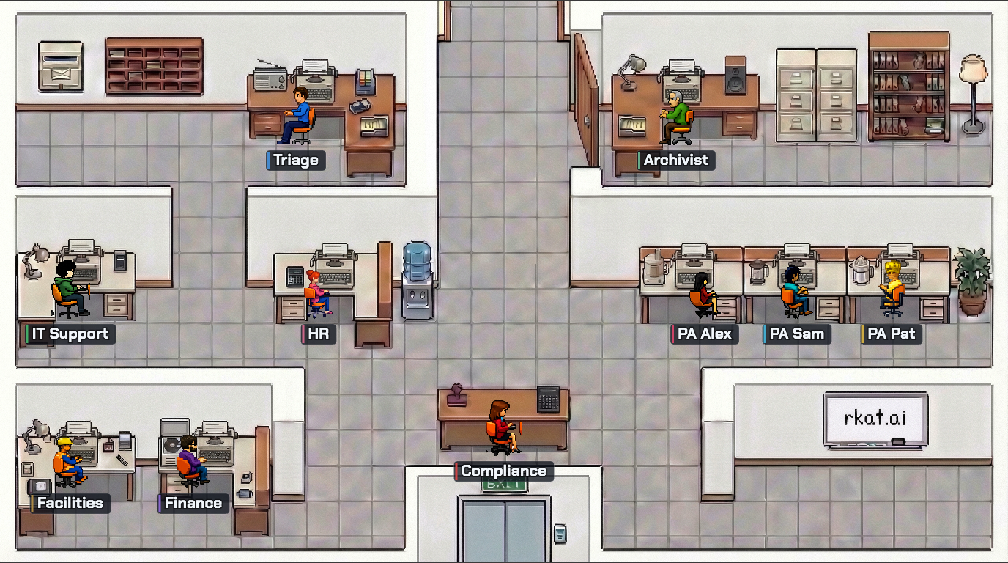
Ten agents at their desks in The Office demo
Try it in your browser

The Office

Drop in a server alert and watch ten agents coordinate. The harness runs locally in your browser as WebAssembly, with model calls over an API.

Enter the office
# install (or: cargo install rkat)
$ brew install lukacf/meerkat/rkat
$ export RKAT_OPENAI_API_KEY="sk-..."

# one agent, one job
$ cat meeting-notes.txt | rkat run \
    "Turn these notes into dated to-dos."

# continue the same session later
$ rkat run --resume last \
    "Which of these are due this week?"
# Cargo.toml
[dependencies]
meerkat = "=0.9.0"
tokio = { version = "1", features = ["full"] }

// in your service
let mut agent = AgentBuilder::new()
    .model("claude-opus-5-5")
    .system_prompt("You are an incident triage component.")
    .build(llm, tools, store)
    .await?;
let result = agent.run(raw_alert_text.into()).await?;
println!("{}", result.text);
$ pip install meerkat-sdk==0.9.0
$ export RKAT_OPENAI_API_KEY="sk-..."

# main.py
import asyncio
from meerkat import MeerkatClient

async def main():
    async with MeerkatClient() as client:
        session = await client.create_session(
            "What is the capital of France? Answer in one sentence."
        )
        print(session.text)

asyncio.run(main())
$ npm install @rkat/sdk@0.9.0
$ export RKAT_OPENAI_API_KEY="sk-..."

// main.ts
import { MeerkatClient } from "@rkat/sdk";

const client = new MeerkatClient();
await client.connect();
const session = await client.createSession(
  "What is the capital of France? Answer in one sentence.",
);
console.log(session.text);
await client.close();

# paste into your coding agent

Install Meerkat with: brew install lukacf/meerkat/rkat
Use my provider key from RKAT_OPENAI_API_KEY, ANTHROPIC_API_KEY or GEMINI_API_KEY.
Read https://docs.rkat.ai/llms.txt before you write any code.
Then embed Meerkat in this project through the Python SDK (meerkat-sdk), the TypeScript SDK (@rkat/sdk) or the Rust crate (meerkat), whichever fits it.